
How to Submit a Residential HPWH Application Through TESSA
Getting a residential HPWH accepted under the NSW Energy Savings Scheme (ESS) requires a product acceptance application through the IPART TESSA portal. EnergyAE prepares the modelling reports and submission package. You submit the application through your TESSA account using the data and files EnergyAE provides.
Before you start
You need an active TESSA account with an authorised signatory before a submission can be lodged. If these are not yet in place, see IPART’s account setup instructions. Setting this up takes time, so do it early in the project.
EnergyAE will provide a submission package before you begin. Each file in that package is named with a suffix that identifies the document type. Use this suffix to match each file to the correct upload slot in TESSA.
Raising a case
Log in to the TESSA portal at tessa.energysustainabilityschemes.nsw.gov.au.
From the home screen, scroll to the Raise a Case section and click Application for Product Acceptance.
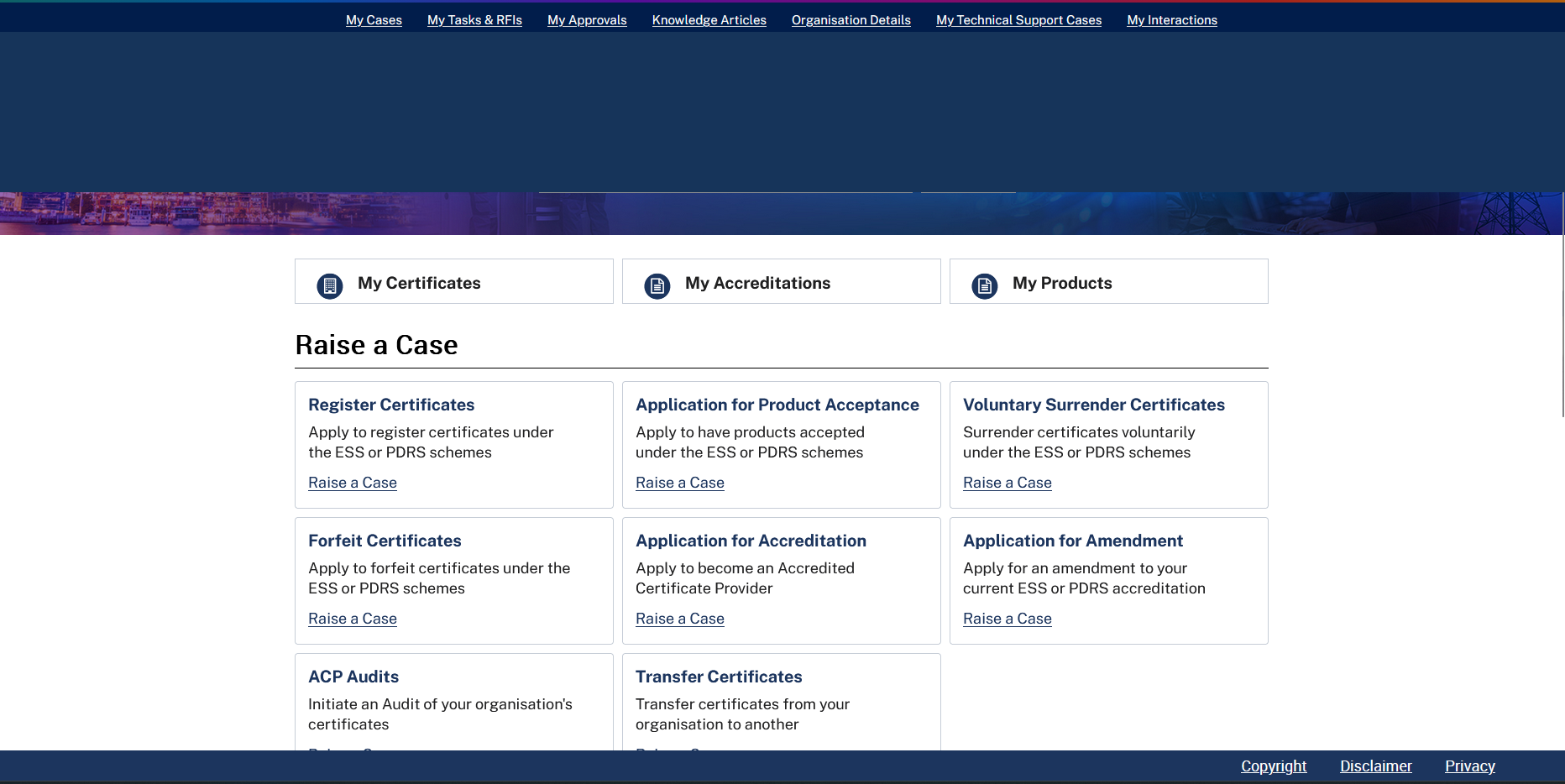
The requestor details (Organisation Name and Organisation ID) will pre-populate from your account. Confirm that the Contact Name is correct before proceeding.
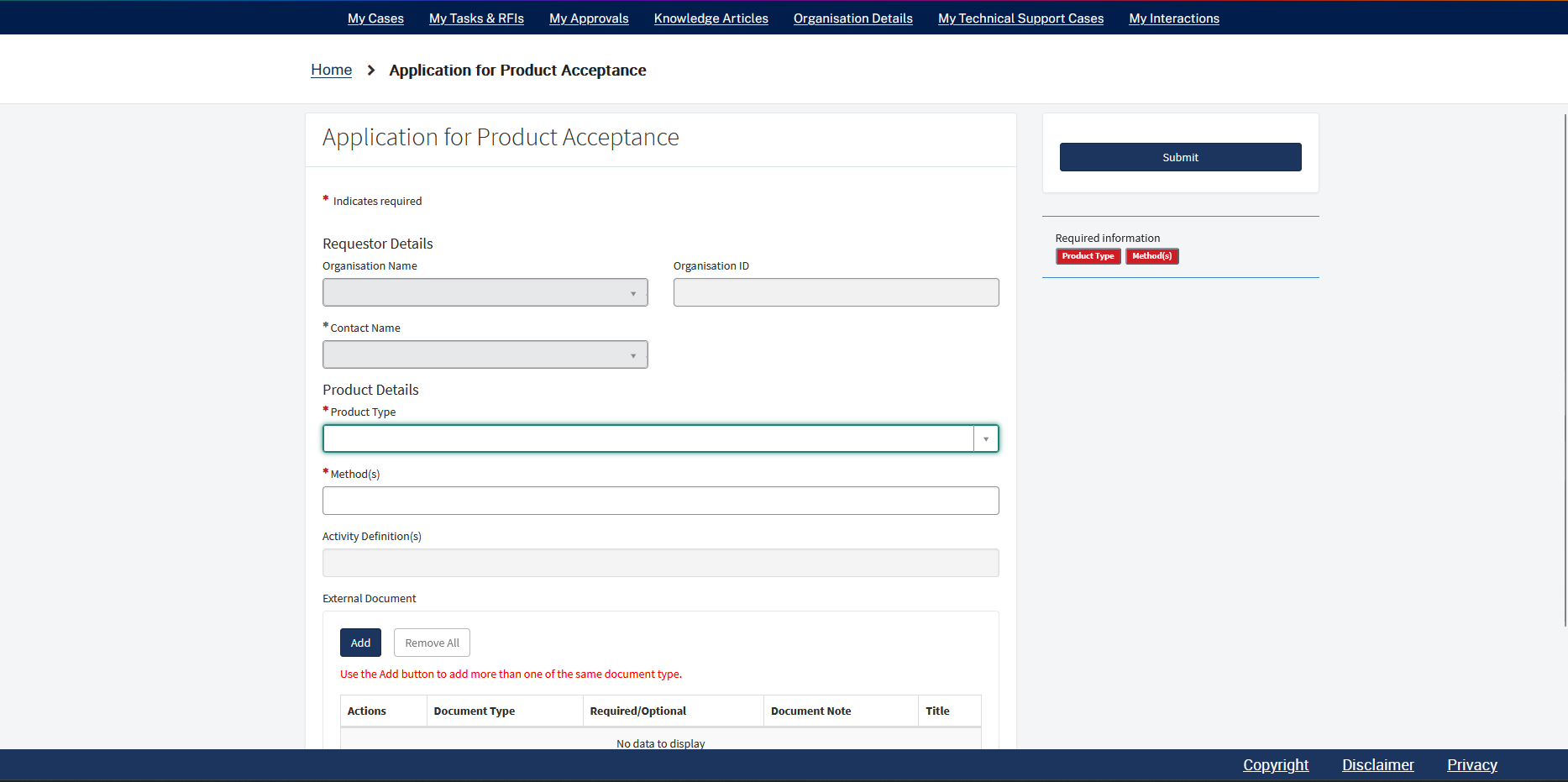
Product type and method
Under Product Details, set Product Type to Water Heater - Heat Pump.
This is not the same as “Water Heater Systems - Heat Pump”, which applies to large commercial IHEAB submissions. Selecting the wrong product type will give you IHEAB activity definitions (F16, F17) instead of HEER, and the submission will be made under the wrong method.
Set Method(s) to HEER. The Activity Definition(s) field will auto-populate with D19 and D17.
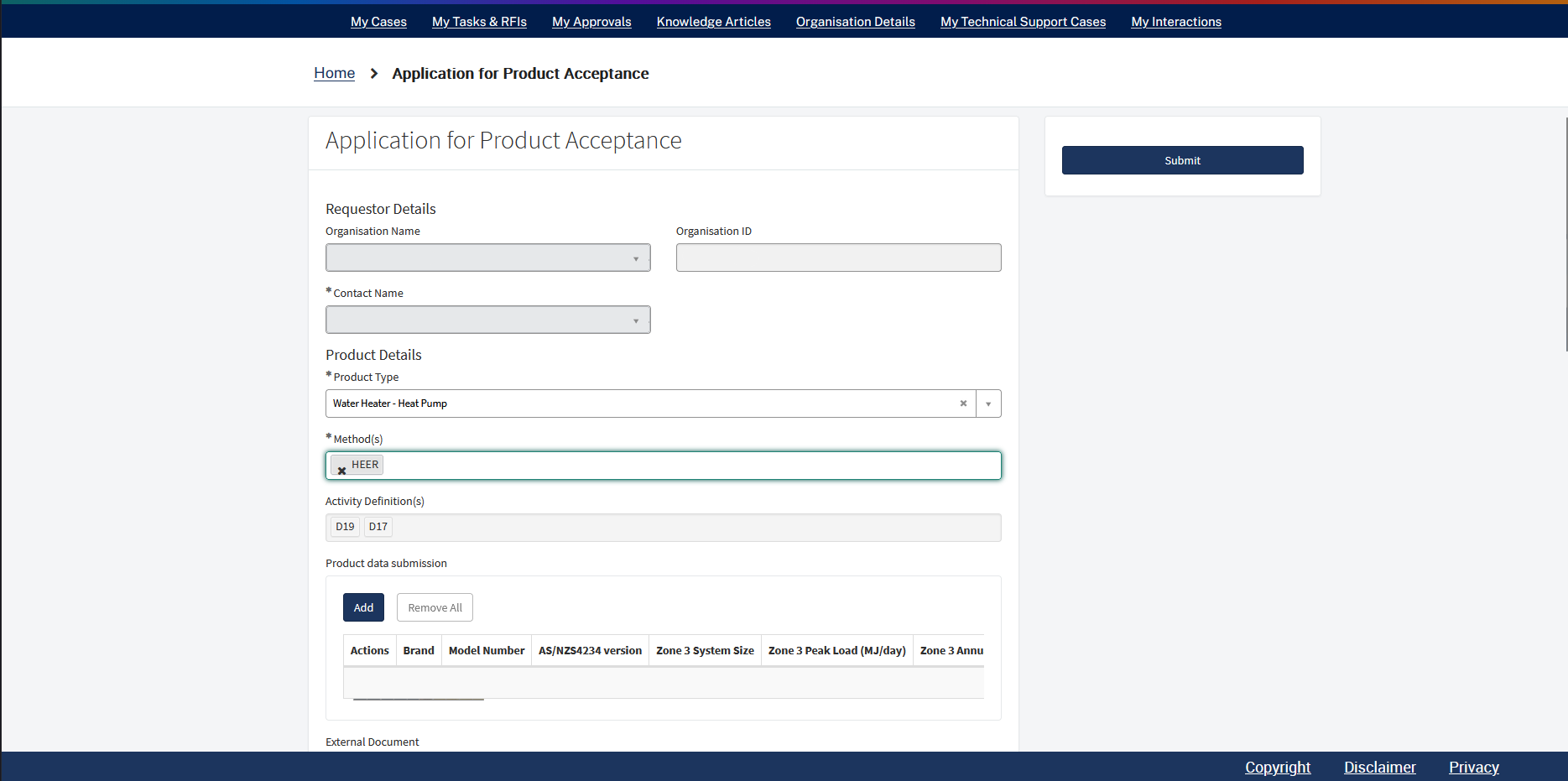 Correct: “Water Heater - Heat Pump” with HEER selected — activity definitions D19 and D17 populate automatically.
Product data submission
Click Add to open the data entry row. Enter the values from the EnergyAE data entry sheet exactly as supplied — do not estimate or round.
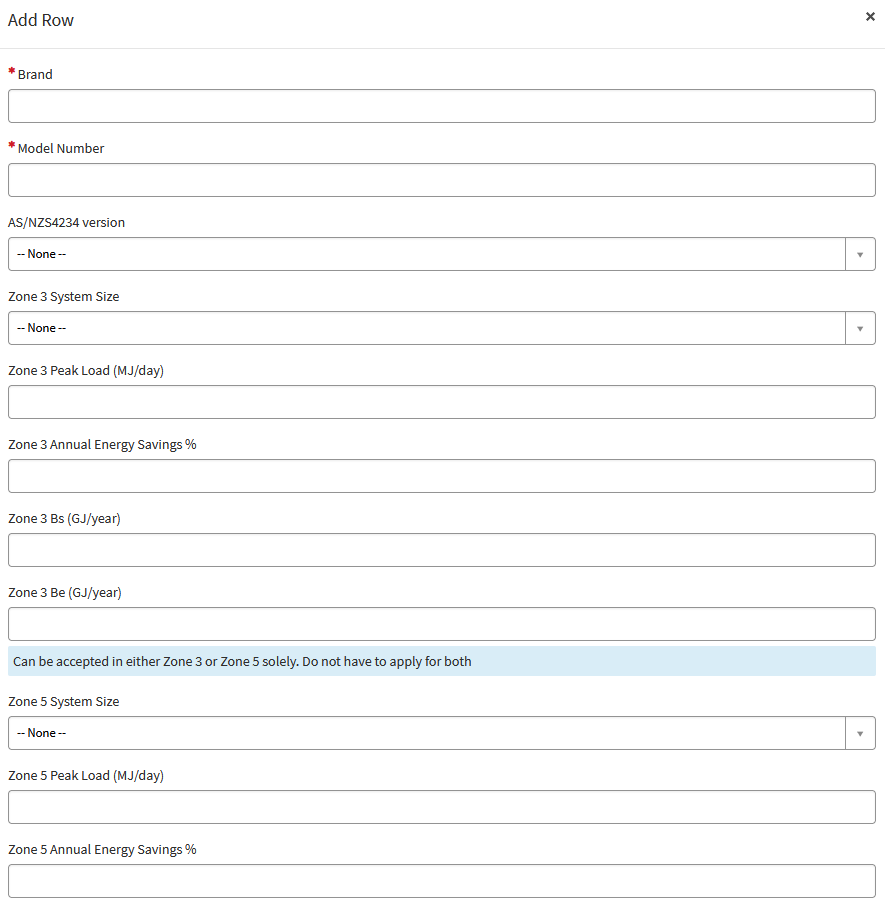
Set AS/NZS 4234 version and Zone System Size using the dropdowns. EnergyAE will confirm which options apply.
For zone fields, only enter values for the zones shown in the data entry sheet. TESSA notes that you can apply for Zone 3 or Zone 5 solely — you do not have to apply for both.
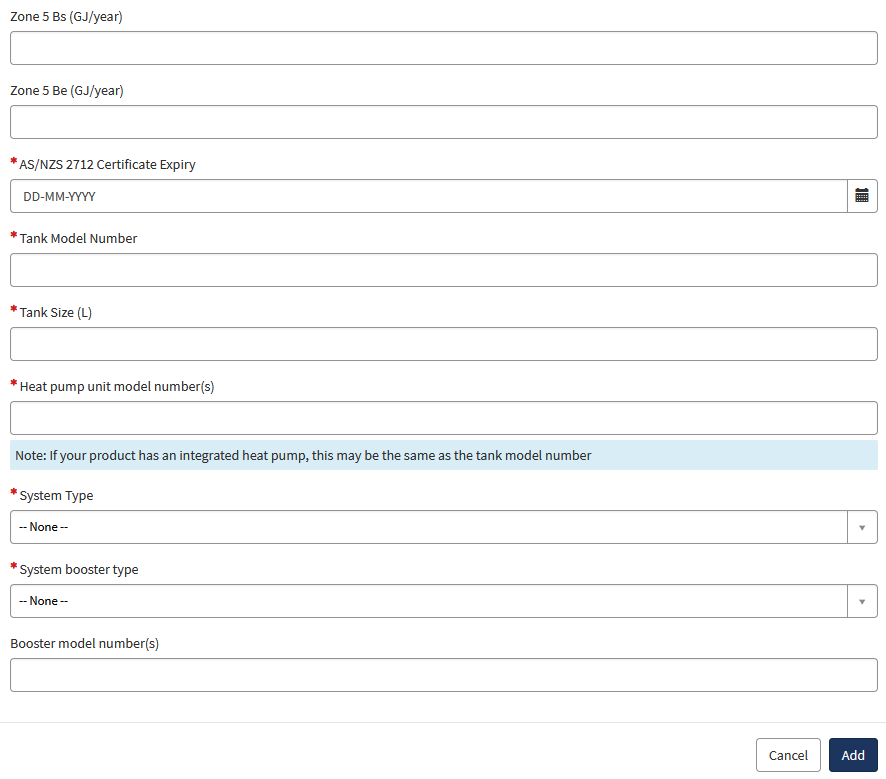
The lower part of the form requires additional product information:
- AS/NZS 2712 Certificate Expiry — the expiry date printed on the certificate EnergyAE provides
- Tank Model Number and Tank Size (L) — the storage tank model and its volume in litres
- Heat pump unit model number(s) — for products with an integrated heat pump, this will be the same as the tank model number
- System Type and System booster type — select from the dropdowns as specified by EnergyAE
- Booster model number(s) — if applicable
Enter these exactly as provided by EnergyAE. Click Add to save the row once all fields are complete.
Uploading supporting documents
EnergyAE packages all submission files in a ZIP named after the system model (for example, AQ_HPW10-300.zip). Extract the ZIP before you begin. TESSA does not accept ZIP files.
Every file inside the package is named using the format BRAND_MODEL_SUFFIX.ext. The suffix at the end of the filename tells you which document type to select in TESSA.
External documents
Scroll to the External Document section and click Add for each file. Select the matching document type from the dropdown using the table below.
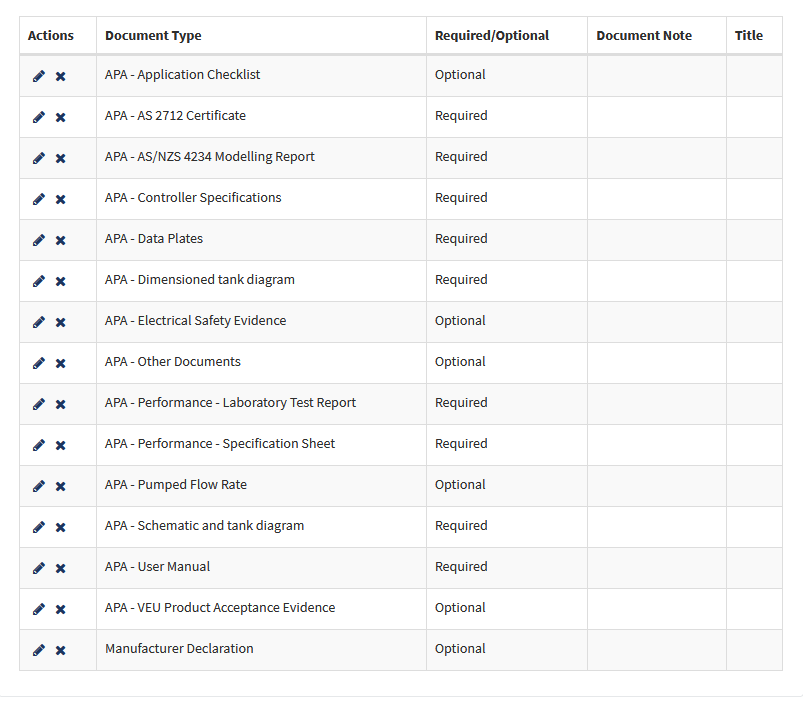
| File suffix | What the file contains | TESSA document type | Required |
|---|---|---|---|
_Res_4234 | AS/NZS 4234 residential modelling report | APA - AS/NZS 4234 Modelling Report | Required |
_2712 | AS/NZS 2712 electrical safety certificate | APA - AS 2712 Certificate | Required |
_Control | Control logic: setpoints, deadbands, and operating sequence | APA - Controller Specifications | Required |
_HPDataplate | Heat pump unit data plate image | APA - Data Plates | Required |
_TankDataplate | Tank data plate image | APA - Data Plates | Required |
_Dimension | Tank dimension drawing: geometry, insulation, and connection heights. Upload the PDF version. | APA - Dimensioned tank diagram | Required |
_EESS | EESS equipment registration certificate | APA - Electrical Safety Evidence | Optional |
_EN14511 | EN 14511 heat pump performance test report | APA - Performance - Laboratory Test Report | Required |
_Specifications | System performance specification sheet | APA - Performance - Specification Sheet | Required |
_Pump | Circulation pump performance data | APA - Pumped Flow Rate | Optional |
_Schematic | System schematic drawing | APA - Schematic and tank diagram | Required |
_Manual | Installation and operation manual | APA - User Manual | Required |
_Warranty | Product warranty documentation | APA - Other Documents | Optional |
_CMT | Controller declaration form (client-signed) | Manufacturer Declaration | Optional |
Modelling documents
The TRNSYS simulation files are uploaded in a separate section below the external documents. Scroll down to Modelling documents (TRNSYS or other modelling).
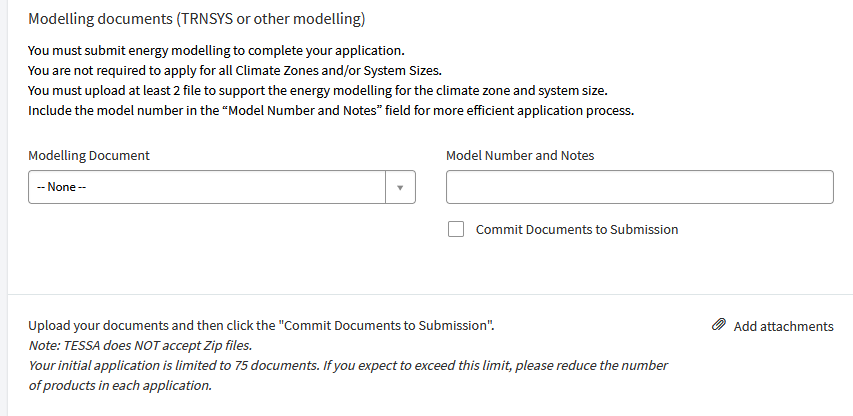
The TRNSYS files are in the TRNSYS_files/ subfolder of the package. For each zone you are applying for, select the three zone files together in the file explorer popup: the .dck simulation input, the .out results file, and the .lst log file. Enter the system model number in the Model Number and Notes field.
TESSA requires at least two modelling files per application. Once all files are attached, check Commit Documents to Submission before proceeding.
Submitting the application
Review the product data and uploaded documents, then click Submit.
IPART will contact EnergyAE directly with any technical questions about the submission. Products are typically added to the accepted products list within 6 to 10 weeks of a complete submission.
For questions about the application content, contact EnergyAE.