
Integral HP Template
Understanding the TRNSYS deck for an Integral HPWH in TRNSYS 15.
Overview
Integral heat pumps are a tank with a wrap-around condenser HX. To model this HP, we use Type 138 which is part of the TRNAUS extension package. The model is formulated in an interesting manner. Read on to understand how it works. This article will double as a TRNSYS 15 explainer.
This article goes through the default “Dom_Integral_HP_V30.DCK” TRNSYS deck file for an integral heat pump water heater, download it and go through it for reference:
Recall: integral HP refers to a water tank with an ‘integral’ condenser. This means the heat transfer from refrigerant to tank occurs at the tank wall, by means of a wrap-around condenser. The condenser refers to either wrapped copper coils, or aluminium microchannel HX jacket. Both of these have hot refrigerant gas flowing through.
You can have an integral HP with a split/separate HP unit so long as the refrigerant is cycling through the wrap-around condenser, as opposed to water flow.
Opening statements
The start of the deck explains the type of system. It uses * characters to denote a comment, which is skipped over by the TRNSYS engine.
*Integral heat pump with tank wrap-around heat exchanger - V30 Revised 19/02/2017

*ASSIGN statement sets the output file names to the deck file name.
*Do not change, *** automatically sets output to same as deck filename
Assign statements
The next statements “assign” the OUT file and LST files to a unique “logical unit number”.
ASSIGN ***.OUT 2
ASSIGN ***.lst 6
*ASSIGN Mode4IAM.txt 8  !  Used for evacuated tube collectors only
ASSIGN ***.OUT 2 means ASSIGN the file name ”***.OUT” to a logical unit number of 2.
*** is a shorthand for the same file name as the current TRNSYS deck filename. In this case it refers to “Dom_Integral_HP_V30”. So when you run this DCK file, it will produce a file with the path “Dom_Integral_HP_V30.OUT” and “Dom_Integral_HP_V30.lst”.
A “logical unit number” (LUN) is a number that can be used to refer to a filepath. So later on when the results are printed to a file, the LUN of 2 is used in the Printer unit to refer to the OUT file.
Simulation settings
The next statements are simulating settings.
WIDTH 80
* Do not increase time step or tolerances
SIMULATION 1.0 8760 .02
TOLERANCES .005 .005
LIMITS 50 15 50
You can ignore the “WIDTH 80” line.
SIMULATION 1.0 8760 .02 is setting the simulation START, STOP and TIMESTEP.
In this case:
- START TIME = 1.0 hours (TRNSYS 15 has a quirk where you set the start time = 1 rather than 0.)
- STOP time = 8760 hours (one year)
- TIMESTEP = 0.02 hours (this is the largest timestep acceptable, you may only reduce to 0.01 or 0.005 if the simulation crashes early with a convergence error.)
TOLERANCES and LIMITS are convergence settings. Do not change these.
Load size and zone
Next we set the load size and climate zone.
* ----------- SET LOAD SIZE AND ZONE-----------

constants 1
*Specify domestic system load size 1 or 2  (1=small, 2=medium)
*Note load size 3 is not available for heat pumps
Load_size = 2

*specify zone number
include  C:\TRNSYS15\Include&weather\ZONE3_NW_Domestic.inc
Load size refers to the total amount of energy that must be delivered to the load each day.
At this point refer to the “include” file, line 115:
The include file for climate zone 3
*Set peak daily winter load in MJ/day
PKLOAD = 22.5*eql(load_size,1)+38*eql(load_size,2)+57*eql(load_size,3)
The equation for PKLOAD gets the value of either 22.5, 38, or 57, depending on the value of “load_size”.
If load_size = 1, then eql(load_size,1) will equal 1. Otherwise, it will equal 0.
In this case, load_size = 2, therefore PKLOAD = 38.
The statement include C:\TRNSYS15\Include&weather\ZONE3_NW_Domestic.inc essentially copies in all the contents of the include file: C:\TRNSYS15\Include&weather\ZONE3_NW_Domestic.inc. It is done in this way to extract all the contents of the zone 3 include file into a separate file which should not be edited.
We need to run annual simulations for a range of climate zones, typically zones 1-5. This requires a new DCK file for each simulation, where the only change between these is the include file zone number, i.e. the filepath will be changed to C:\TRNSYS15\Include&weather\ZONE4_NW_Domestic.inc for zone 4. We do this automatically with our Excel VBA macros.
Rating process
The next lines are instructions on how to ensure the results are compliant with CER requirements. Read through again to understand.
* -----RATING PROCESS FOR ZONES 1 to 4 (Australia)  ----------
*  1) Select zone3_northwest and the desired load size (Load_size = 1 or 2)
*       Run simulation
*      Check the top line of the output file for load delivered at temperature less than 45 Deg. C and the annual energy savings
*      If there is any delivered energy below 45 Deg. C or
*      If the annual energy saving is less than 60% then reduce Load_size and re-run the simulation
*      All delivered load must be above 45 Deg. C
*      The 60% annual energy savings  does not apply for Load_size=1

*  2)  Once the load size is determined for zone3_Northwest then run other zones using the same load size
Product Parameters
Next is a list of all the product parameters.
*------PRODUCT PARAMETERS --------------------------------
constants 46
constants 46 warns the TRNSYS engine that it is about to read in the values of 46 constant parameters. These will be used to dimension the model.
First the tank parameters:
*VARIABLES FOR TANK
VOL =  270 / 1000  !  Physical  tank volume in m^3
Dia = 0.500  ! Inner tank Diameter in m
height =   vol/(3.14159*Dia^2/4)
*Heat pump thermostat
Tset_hp =  60
Tdb_hp =  10
The set point Tset_hp=60 and the dead band is Tdp_hp=10. We would say the HP control settings are 60/10.
The dead band is the amount of hysteresis in the system, which prevents the HP turning on/off too frequently, which would waste energy. See the diagram below. A dead band of 10K means that heating is initiated when the temperature sensor is below 50degC. Heating is applied until the temperature sensor is above 60degC.
.png)
Temperature sensor location
Tank locations are described in terms of “volume above” the location.
volhth = 100/1000 ! volume above sensor m3
HTH1 =  height*(vol-volhth)/vol
HAUX1 = HTH1-.02
The sensor volhth has 100L above it. All volumes are measured in cubic metres (m3).
Auxiliary temperature
Next the Taux parameter, which refers to the ambient temperature below which the element will be activated to take over from the HP. Heat pumps cannot operate when the air temperature is very cold, normally less than -7degC.
*Tamb<Taux auxiliary booster ON & heat pump OFF
*Taux is the temperature below that the heat pump is turned off and the auxiliary element becomes operational.
*Set Taux to a very low value if there is no active auxiliary element.
Taux = -6  ! Deg. C
However note that in all the weather files we simulate, the lowest air temperature is -4.5degC in zone 5. So if Taux has a value less than -5, then the element will never be activated.
Auxiliary element
The auxiliary element settings consist of the control settings (setpoint/deadband), element capacity, height of element and thermostat in the tank.
This 3.6kW element will turn on when the sensor 26.8L from the top drops below 52degC, and turn off at 60degC.
*auxiliary element (only active when Tamb < Taux)
Tset2 = 60
Tdb2 = 8
aux2 = 3.6 * 1000 * 3.6  ! Auxiliary input power rating in kJ/h
Volaux2 = 85.6 /1000
Voltht2 = 26.8/1000
HTH2 =  height*(Vol-Voltht2)/Vol
HAUX2 = height*(Vol-Volaux2)/Vol

Volcold = 270/1000 ! volume above cold water inlet
HCOLD =  height*(Vol-Volcold)/Vol ! height of cold water inlet from base
Tank heat loss
Tank heat loss is stored in the parameter AS4692 which is taken from the AS/NZS 4692 tank heat loss test report:
*AS4692 standing heat loss in kWh/d at DeltaT = 55 K
AS4692 = 2.0
UA = AS4692 *3.6 * 1000000 / 24 / 3600 /55 * 3.6
UA converts the AS4692 value from units of kWh/d into kJ/hr.m^2/K.
Condenser coil
Regardless of whether the condenser coil is a wrap-around copper coil or aluminium microchannel HX, it is represented as a wrap-around coil in the TRNSYS model. The following dimensions should be marked on the tank drawing.
*vol above top of wrap around condenser
Volhxtop = 50/1000
Hret= height*(Vol-Volhxtop)/Vol

*tank wall
Twall = 0.0030
Kwall = 50 *3.6
TKwall=Twall*Kwall
*Refrigerant tubing wall thickness
ttube = 0.001
ktube = 350 *3.6
TKtube = ttube*ktube
Lhx = 49
Dhx = .01
Tanks are almost always vertical, and the Hxmode=4 for an external condenser coil. If an internal coil is used, change Hxmode: Hxmode = 5.
*TYPE138 vertical tank Tkmode = 1
Tkmode = 1
*TYPE138 wrap-around heat exchanger (condenser) Hxmode = 4
Hxmode = 4
Heat pump efficiency coefficients
The HP efficiency coefficients come from the AS/NZS 5125.1 test report:
*Heat pump power coefficients
p0 = 0.500
p1 = 0.015
p2 = -0.00009
p3 = 0.015

*COP coefficients - new heat pump standard correlation
a0 = 4.5
a1 = -0.07
a2 = 0.0003
a3 = -0.02   ! The sign of a3 must correspond to cop1 = a0 + a1*dt1 + a2*dt1^2 + a3*dt2
*Note there is an error in eqn(4.4) of ASNZS 5125.1:2010 for the sign in front of the a3 coefficient.
*In AS/NZS 5125:2010 COP eqn (4.4) the sign in front of the a3 term is negative, which is different from
*the sign used here.
*Make sure the COP eqn in the heat pump test report is consistent with the one used below (see 'Heat pump' section).
Frosting penalty
The frosting penalty is calculated by EnergyAE by comparing the simulated COP vs tested COP at low temperature conditions.
*HP frosting penalty for low temperature operation
Tifr = 7  !  Initial frosting temperature in Deg. C
FP1 = 0.3  ! Frosting penalty at 1 Deg. C
The initial frosting temperature (Tifr) is the air temperature below which frosting will start to form on the evaporator. This will reduce the COP. The COP & Power coefficients do not incorporate frosting, this is why the Frosting Penalty comes into play below Tifr, once frosting would be observed.
Frosting penalty is given in decimal form, i.e. 0.3 = 30%.
Power tolerance
The following parameters are used to help control the compressor, this will be explained in more detailed further down.
*Ton=power tolerance not temperature
Tolon =  .2
Toloff =  .1
DTHX parameter
The DTHX parameter is the calibrated temperature difference between the tank water temperature and the condenser HX. Explained more below.
*Heat exchanger temperature difference - from test data
DThx = 10
Standby power
The standby power is how much power the HP consumes when the compressor is not running, it is just standing idle. The base value is measured in W in the AS/NZS 5125.1 test report, then converted into kJ/h by *3.6.
*Standby power
Standby = 2.0*3.6  ! Standby power in kJ/h
Start of the simulation model
The deck template defines all the variables that may appear in the next section that originate from the include file:
*----- START OF SIMULATION MODEL -------------------

* -------------------------------------------
*Variables defined in include file
*Tcold     cold water temperature ¦C
*Tamb      ambient temperature    ¦C
*Tambc   effective air temperature  ¦C
*Tdp        dew point temperature ¦C
*Twet      ambient wet bulb temperature ¦C
*GH        global raDiation  kJ/h m2
*Gb        beam raDiation    kJ/h m2
*CC        cloud cover (1/8ths)
*SLOPE     collector slope
*AZ        collector azimuth
*ldflw  load flow rate kg/h
* ------------------------------------------
Electrical power availability
Normally all HP are modelled with continuous 24 hour power supply. However it is possible to model units which are only provided power during off-peak periods by adjusting the TYPE 14 forcing function.
UNIT 26 TYPE 14
*Off-peak or continuous electrical power
*(off-peak 1 electricity supply 10 p.m. to 7 a.m. - a period of 9 h)
*(off-peak 2 electricity supply 10 p.m. to 5 p.m. - a period of 19 h)
PARAMETERS 16
0,1  7,1
7,1 17,1
17,1  22,1
22,1  24,1
*Output [26,1] average value of the function over the time step (0 or 1 in this case)
For example, to model a unit with off-peak 1, which has electricity supply 10pm-7am, a period of 9h per 24h period the code would be changed as follows:
UNIT 26 TYPE 14
*Off-peak 1 electricity supply 10 p.m. to 7 a.m. - a period of 9 h
PARAMETERS 16
0,1  7,1
7,0 17,0
17,0  22,0
22,1  24,1
Note the distinction between UNIT and TYPE numbers:
- UNIT 26 refers to a unique UNIT number, where a UNIT is a single instance of a TYPE.
- TYPE 14 refers to the component type, which in this case is a Forcing Function. There are many different types of components available in TRNSYS, from real components like pipes, tanks, pumps, and admin components like printers, plotters and forcing functions. Each different component has a different TYPE number.
See the TRNSYS 15 Index to learn about all the different component types in TRNSYS 15:
Auxiliary element over-ride
The next two equations are used to determine when the HP or auxiliary element are enabled.
eqn 2
*Turn HP off below Taux and use electric element instead
HP_onoff = GT(Tamb,Taux)*[26,1]
aux_onoff = (1-HP_onoff)*[26,1]
If the ambient temperature (Tamb) is greater than (GT) the auxiliary cut-off temperature (Taux), AND the electrical power supply is on ([26,1]) then HP_onoff = 1.
Recap on the GT function: GT(A,B)=1 if A>B, otherwise GT(A,B)=0 if A<=B.
[26,1] refers to the first output of unit 26. This is how the output of one unit can be used as an input to an equation or other unit.
The syntax is: [UNIT NUMBER, OUTPUT NUMBER].
Refer to the TRNSYS 15 Index above, and go to the TYPE 14 FORCING FUNCTION section.
.png)
Note that OUTPUT #1 = the average value of the function over the timestep.
Thus [26,1] will equal 0 or 1 depending on the time of day, depending on whether it is setup for continuous or off-peak supply.
Temperature differences
The regression equations in the AS/NZS 5125 report refer to temperate differences (Tw-Ta) and (Twet-Tdp). See an excerpt from an AS/NZS 5125 report:
.png)
The following equations form these temperature differences dt1 = (Tw-Ta) and dt2 = (Twet-Tdp):
eqn 9
*Tcoil = average water temperature adjacent to condenser coil
Tcoil = [38,20]
*Tcoil-Tamb
dt1 = Tcoil - Tamb
*Twet -Tdp
dt2 = Twet - [33,8]
Tcoil = [38,20] means the 20th output of unit 38. Skipping ahead to line 201 in the DCK you will see:
UNIT 38 TYPE 138 TANKUNIT 38 is a TYPE 138 TANK. You will not find TYPE 138 in the TRNSYS 15 Index, because it is a special component from the TRNAUS extension library. See the TRNAUS library documentation:
Go to pages 42-44 to see the parameters/inputs/outputs for TYPE 138 - Stratified Tank, specifically the ouputs list:
.png)
TYPE 138 outputs list
See output 20 = Tw = water tempreature in tank adjacent to the heat exchanger, C (average over depth of heat exchanger).
Therefore Tcoil = [38,20].
Power and COP equations
The power and COP is now calculated, just as in the AS/NZS 5125.1 test report:
power = (p0+p1*Tcoil+p2*Tcoil^2+p3*Tamb)*1000*3.6*[20,1]
cop1 = a0 + a1*dt1 + a2*dt1^2 + a3*dt2
Note power is multiplied by *1000 to convert from kW to W, *3.6 to convert from W to kJ/h, and *[20,1] to turn the power on or off depending on whether the compressor is running. That is because UNIT 20 is the compressor controller, we will see that just below.
Frosting penalty
The frosting penalty value FP1=0.3 that we saw in the parameters is the value when Tamb = 1degC. But in fact the frosting penalty is 0 when Tamb=Tifr, and 0.3 when Tamb=1, and in between it is linearly interpolated. Refer to AS/NZS 4234:2021 4.8.6.2.2:
.png)
.png)
This is programmed in TRNSYS with the next equations:
*Frosting penalty FP below Tifr
*Activate frosting penalty by changing the above cop to cop1 and by removing the leading * from the below three lines
*and changing the above eqn number from 7 to 9
FP = GT(Tamb,1)*LT(Tamb,Tifr)*FP1*((Tifr - Tamb)/(Tifr - 1)) + (1 - GT(Tamb,1))*FP1
cop = (1 - FP)*cop1
Let’s break the equation for FP down into sections.
The first part GT(Tamb,1)*LT(Tamb,Tifr) will be equal to 1 if both conditions are true: Tamb>1 AND Tamb>Tifr. In other words, when Tamb is in between 1degC and Tifr (typically around 8degC).
Assuming Tamb = 4, and Tifr = 8, then the first two terms will equal 1. The equation for FP will be reduced to:
FP = FP1*((Tifr - Tamb)/(Tifr - 1))The expression ((Tifr - Tamb)/(Tifr - 1)) is the linear interpolation. See below sketch:
.png)
$$ (Tifr-1)/FP1 = (Tifr-Tamb)/FP $$
$$ FP = FP1*(Tifr-Tamb)/(Tifr-1) $$
The last part of the equation: (1 - GT(Tamb,1))*FP1 is saying that if Tamb<1, then FP=FP1, which is consistent with Figure 4.8.6.2.2 above.
DTHX Application
Refer to the diagram below to understand how DTHX is applied:
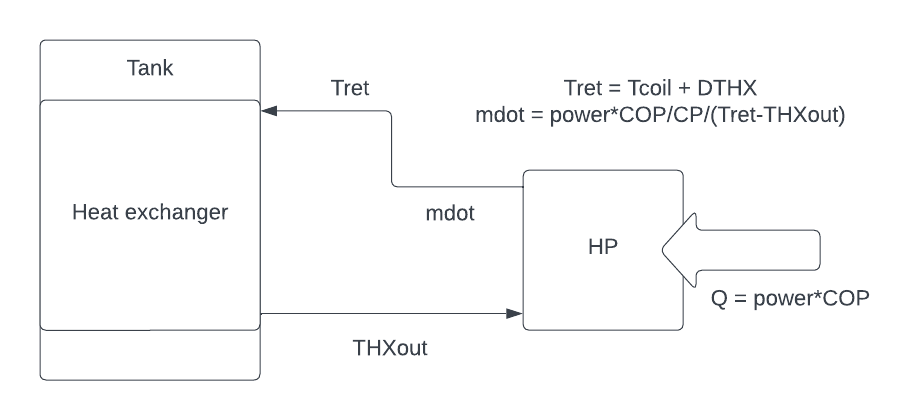
Schematic of Type 138 model
Knowing how integral HP function, we can assume that Tret is hotter than the tank temperature Tcoil by a constant temperature difference DThx:
Tret = Tcoil+DThx ! Temperature of fluid returned from heat pumpDTHX is the temperature difference between the tank water temperature and the incoming temperature to the HX wrapped around the tank. Refer again to the Type 138 schematic above.
To represent hot refrigerant gas passing through the wrap-around condenser, we model an external HX with a high flow rate of water, incoming at temperature ‘Tret’, and flowrate ‘pflow1’.
As we use water as the HX fluid, the temperature of the water in the HX has no direct relation to the temperature of the refrigerant, nor could we measure this. So how to determine ‘Tret’ and ‘pflow1’? What we do know is the COP and Power of the HP as a function of tank & ambient temperature. Therefore we know the thermal capacity ‘Q’:
Q = power*copWe also know the water temperature exiting the modelled wrap-around HX, ‘THXout’.
Once we know ‘Tret’, and we know ‘Q’ and ‘THXout’, we can calculate the final variable ‘pflow1’, the flow rate of this loop:
Pflow1 = power*cop/4.18/(Tret-THXout)This is a simplified version of what is actually in the TRNSYS DCK. The full version is:
Pflow1 = min(2500,power*cop/4.18/max(1,(Tret-[38,1]))*[20,1])Let’s assign M=power*cop/4.18/max(1,(Tret-[38,1]) to make the equation simpler:
Pflow1 = min(2500,M)*[20,1])Now you can see that Pflow1 is equal to M, or 2500, whichever is smaller. Essentially, the flowrate cannot be greater than 2500 kg/hr. This would only occur if the temperature difference (Tret-THXout) was very small. For most of the time, M << 2500.
Then *[20,1] turns the flow rate on/off depending on if the compressor is on/off.
Convergence promoter
If pflow1 is changing rapidly, TYPE 44 helps to smooth out the value of pflow1 to help achieve convergence. This is a technical point.
UNIT 44 TYPE 44 convergence promoter
parameters 1
15
inputs 1
pflow1
 0

eqn 1
pflow=[44,1]
Compressor controller
Now the compressor controller TYPE 20 which has already been referred to a few times. There is a slightly strange method used to control the heating of the tank.
UNIT 20 TYPE 2 COMPRESSOR CONTROLLER
*NOTE the power tolerance for ON OFF control is not temperature difference, hence Tolon>minimum aux power set only
* compressor run signal is taken from a first aux element in the type138 tank
* the aux power is set to 0.3 kJ/h in type138
* the aux signal cannot be used directly as an NSTCK check is essential
PARAMETERS 2
5  200
INPUTS 6
38,8 0,0 38,3 20,1 0,0 0,0
 0   0    20      1   Tolon   Toloff
We learnt before in the DTHX section that a wrap-around water-filled HX coil is used to impart the correct amount of heat to the tank water, with the heat capacity being Q=power*cop. Then the value of DTHX is adjusted to achieve the correct vertical distribution of that heat so we model accurate thermal stratification.
How do we know when to turn the compressor on or off? This depends on temperature at the mid-sensor, when it drops below Tset_hp-Tdb_hp.
Refer to the below figure, which assumes Tset=60, Tdb_hp=10:
.png)
HP control plot
Left axis shows the temperature at the mid-sensor, usually at around 45% position (just above middle). This starts at 60degC and when it drops 10K down to 50degC, the compressor turns on, heating the tank water until it reaches 60degC, then compressor turns off.
Dead-bands
The dead-band of 10K acts as a form of hysteresis, to ensure a longer running time of the HP. If there was no dead-band, the HP would continually be turning on and off at the set point. A large dead-band like 15K produces less frequent but longer duration heating cycles, while a smaller dead-band like 2K produces frequent shorter duration heating cycles.
The crux is that we cannot output the temperature at the 45% mark directly from the TYPE 138 tank. So we need a work-around. The solution is to put an auxiliary element at the position of the sensor, and give it a tiny capacity of 0.3 kJ/hr. We assign this element a set point/dead-band of 60/10 as above.
When T45<50, the element turns on and starts to add 0.3 kJ/hr to the tank at this position.
Refer again to TYPE 138 output list and see that you can output the rate of total auxiliary input to tank from output 8.
.png)
Therefore the element output is: Qaux = [38,8].
Now refer again to UNIT 20 TYPE 2 compressor controller:
UNIT 20 TYPE 2 COMPRESSOR CONTROLLER
*NOTE the power tolerance for ON OFF control is not temperature difference, hence Tolon>minimum aux power set only
* compressor run signal is taken from a first aux element in the type138 tank
* the aux power is set to 0.3 kJ/h in type138
* the aux signal cannot be used directly as an NSTCK check is essential
PARAMETERS 2
5  200
INPUTS 6
38,8 0,0 38,3 20,1 0,0 0,0
 0   0    20      1   Tolon   Toloff
TYPE 2 is a differential controller with hysteresis, meaning that the future output of the function depends on the current value of the function. Controllers are used instead of simple GT (greater than) functions to assist with convergence.
Hysteresis
Definition: the phenomenon in which the value of a physical property lags behind changes in the effect causing it.
First recall than Tolon = 0.2 and Toloff = 0.1, from the parameter list above.
The controller is basically saying: if Qaux > Tolon, then [20,1]=1. Then once the control signal is on, once Qaux < Toloff, then [20,1]=0. Refer to the sketch below:
.png)
Now the compressor control signal can be used to turn the power and flow rate on or off. The use of the tiny element is a way of exporting information about the point at which the tank temperature at the sensor is below Tset-Tdb.
Tank
The tank model is TYPE 138 which is part of the TRNAUS extension package; refer to TRNAUS manual for documentation of parameters/inputs/outputs.
UNIT 38 TYPE 138 TANK
PARAMETERS 31
HXMODE VOL height Hret 4.18 1000 TKWALL TKMODE UA 1
Tset_hp HCOLD 0.3 HAUX1 HTH1 Tset_hp Tdb_hp 0 .03 95
88 Aux2 Haux2 Hth2  Tset2  Tdb2 Dhx Lhx 0 TKwall
 TKtube
INPUTS 7
*If elec boost is ON (input 7) then HP (input 6) is OFF
Tret pflow Tcold 25,2 Tamb  HP_onoff  aux_onoff
 20    0       0   20  25    1     0
* Output [38,1] is the outlet temperature from the  wrap around heat exchanger in Deg. C

eqn 1
Tout = [38,3]  ! Specify hot water delivery temperature
Tempering valve
The tempering valve works out how much cold water (Tcold) to mix with the hot tank water (Tout) to achieve the prescribed load flow rate (ldflw) at the load delivery temperature (TLOAD) of 45degC.
UNIT 25 TYPE 11 TEMPERING VALVE
*Sets up load volume for required energy load
PARAMETERS 2
4 8
INPUTS 4
Tcold ldflw Tout 0,0
20      0   Tset_hp TLOAD
The schematic below shows the tempering valve (TV) in action.
.png)
Schematic of a tank and tempering valve/mixing valve setup
The tempering valve takes as input the tank top temperature (Tout) as a controller input to help determine the tempering valve position: based on Tout and Tcold and ldflw, what proportion of flow should be diverted to the mixing valve and how much back to the tank, to achieve a mixed temperature of exactly 45degC to the load.
The mixing valve is not included in the model. Since if Tout>45, then it is guaranteed that the mixing valve outlet temperature (Tmix) will be 45degC. If Tout<45 at any point during a load draw-off, then Tmix<45. So when it comes to minimum delivery temperature, we just need to know the minimum value of Tout during a load draw-off. This is shown below.
Energy Balance
The simulation model is now complete. The last section is used to evaluate the results and prepare the output files.
The following equations setup the energy balance and simulation summary statistics such as energy delivered to load, calculation of standby power when compressor is off, etc.
*----- EVALUATION, PRINT OUT AND PLOTTING -------------------

eqns 15
edump = [38,17]
Ta = Tamb/max(1,[49,1])
volx = [38,4]
energy = [38,6]

*Total gas use
gas_tot = 0

Elec=power
Boost = [38,18]
*pump power
auxp = 0
stdby = Standby*(1 - [20,1])
*Total electric energy  use
Elec_tot = elec + boost + auxp + stdby

qu =[38,9]  ! Energy input into tank by heat pump

* interval energy change in tank
de = [38,7]
tloss = [38,5]
*pipe heat loss
ploss = 0

*Product Tout*Mload
txm = Tout * volx
STC and Savings calculation
This section calculates STCs, energy savings %, and minimum delivery temperature.
eqns 4
STC = (ref_elec - [52,2]/1000)/3600*10
Savings = (1-[52,2]/1000/ref_elec)*100
Load_Temp = Tout*GT([25,2],0) + Tset_hp*EQL([25,2],0)  ! Load Delivery Temperature
*Note the Tset_hp*EQL([25,2],0) term prevents a zero load delivery temperature from being
* recorded when there is no load flow
load_less_45 = energy*lt(Tout,45)*gt([25,2],0)/1000
STC calculation is based on how much energy is displaced by the heat pump water heater. This energy is converted to MWh (/3600) and multiplied by a lifetime of 10 years.
$$ STC = (B_{ref}-B_s)/3600*10 $$
Where Bref = reference electric annual energy consumption; Bs = HP electrical annual energy.
Savings % is the percentage reduction in annual electrical consumption for the HP vs the reference electric water heater:
$$ Savings = (1-B_s/B_{ref})*100 $$
Minimum delivery temperature
Minimum delivery temperature is calculated by calculating the minimum of the Load_Temp variable:
Load_Temp = Tout*GT([25,2],0) + Tset_hp*EQL([25,2],0) ! Load Delivery TemperatureIn this equation, Load_Temp gets the value of Tout only when there is a load draw-off. We know if there is a load draw-off by the flow rate at the tempering valve: [25,2]. If [25,2]>0 then there is a load draw-off. Otherwise, Load_Temp gets the value of Tset_hp which is normally 60degC.
Next the minimum value of Load_temp is calculated by using a periodic integrator:
unit 51 type 55 integrator
parameters 7
1 0 8760 0 8760 0 8760
inputs 1
Load_Temp
0
TYPE 55 is a periodic integrator. This can be used for analysing a variable and outputting statistics such as integral, min, max, variance, standard deviation. In this case we are interested in the annual minimum value of Load_Temp, so the UNIT 51 parameters are set up to analyse over a one year period of 8760 hours. TYPE 55 can also be setup to analyse monthly periods, for example if you want to know the minimum delivery temperature for each month.
Further down you will see the minimum delivery temperature printed to the ***.OUT file as the variable [51,7]. The 7th output of TYPE 55 (UNIT 51) is the “minimum value of input”.
Integrators
There are two types of integrators: periodic and quantity. A quantity integrator is a standard type that simply integrates a variable over a set time period.
TYPE 24 is a quantity integrator which below is used to calculate the annual gas consumption (will always be 0), annual electricity consumption of HP, and total load delivered below 45degC (which should be 0). The time period of 8760 indicates annual.
unit 52 type 24 integrator
parameters 1
8760
inputs 3
gas_tot Elec_tot load_less_45
     0      0          0
If you wanted to integrate monthly, use an interval of “-1” instead of “8760”.
Printers
The results are now printed to the ***.OUT file.
At the very top of the deck, we assigned the ***.OUT file path to logical unit number 2. This is now used in parameter 4 of the TYPE 25 printer.
The first line of the ***.OUT file contains a set of summary statistics: zone, load size, STC, Savings %, minimum delivery temperature…
unit 53 type 25 printer
parameters 4
-1 8760 8760 2
format
(f5.0,10x,f3.0,13x,f6.0,10x,f4.1,10x,f9.1,10x,f6.1,10x,f6.1,10x,f6.1,10x,f6.1,10x,f9.1)
inputs 9
zone  Load_size STC  Savings  51,7 51,8 51,9 51,10 52,3
Zone  Load_size STC  Savings% MinDelTemp TimeMin MaxDelTemp TimeMax  Load<45C
See below screenshot from the actual ***.OUT file for this deck:
.png)
.png)
The ***.OUT file contains a few sections:
- First line summary
- Monthly simulation summary tables of 9 variables
- Monthly energy balance
Each printer is set up to append to the previous output generated by each separate printer.
TYPE 28 is a Simulation Summary which prints out the monthly tables. The first just includes the ambient temperature Ta.
UNIT 47 TYPE 28  PRINT OUT
PARAMETERS 10
-1 1 8760 2 2 -11 -1 24 2 -4
INPUTS 1
Ta
LABELS 1
Ta
The next tables include:
- Vol: total volume of water delivered to load [kg]
- energy: total energy delivered to load [kJ]
- Elec_tot: total electrical energy consumption [kJ]
- Tout: average temperature delivered to the mixing valve from top of tank during load draw-off [degC]
- Qut: total thermal energy provided by HP [kJ]
- de: internal energy change of tank [kJ]
- Boost: total electrical consumption of electric element [kJ]
UNIT 46 TYPE 28 PRINT OUT
PARAMETERS 24
-1 1 8760 2 2 1 -12 -4 -13 -4 -14 -4
-15 -12 2 -4 -16 -4 -17 -4  -11 -4 -18 -4
INPUTS 8
de volx energy elec txm qu  tloss boost
CHECK 0.05 5,8,-2,-6,-7
LABELS 8
Vol energy Elec_tot Tout Qut Tloss  de Boost
Plotter
The online plotter can be used to watch the HP simulation through the year.
To turn the plotter on, the 9th parameter of TYPE 65 online plotter should be set to 1.
To turn the plotter off, the 9th parameter should be set to -1.
eqn 3
less45=lt(tout,45)*gt([25,2],0)
pkw=power/3.6/1000
cop2=cop*[20,1]

Unit 65 type 65 plotter
*par7=num plots
* par9=0 to turn off
parameters 10
3 4 0 100 0  5 73 5 1 -1
inputs 7
Tout  38,1 38,19 14,1  less45        cop2  pkw
Tout  TrtoHP Tbot  load  Load_failure   COP   PowerkW
End
This is the end of the integral heat pump TRNSYS deck. I hope you now feel more confident in TRNSYS 15!
END