
DTHX Calibration
All about the DTHX parameter, which defines the amount of stratification in integral HP tanks.
DTHX parameter is only required for integral HPs with a wrap-around condenser.
What is DTHX?
DTHX is a calibration parameter that defines the degree of stratification in integral HP tanks with wrap-around condensers. Reference: AS/NZS 4234:2021 Section 4.8.5.1.
In Type 138 modelling (TRNAUS extension), the wrap-around condenser is represented as an external heat exchanger with hot water at temperature Tret entering at flow rate pflow1. Since we cannot directly measure refrigerant temperature, we instead derive Tret and pflow1 from the HP’s tested COP and Power characteristics.
The thermal capacity Q is defined as:
Q = COP*PowerWe also know the water temperature exiting the modelled wrap-around HX, ‘THXout’.
Refer to the diagram below:
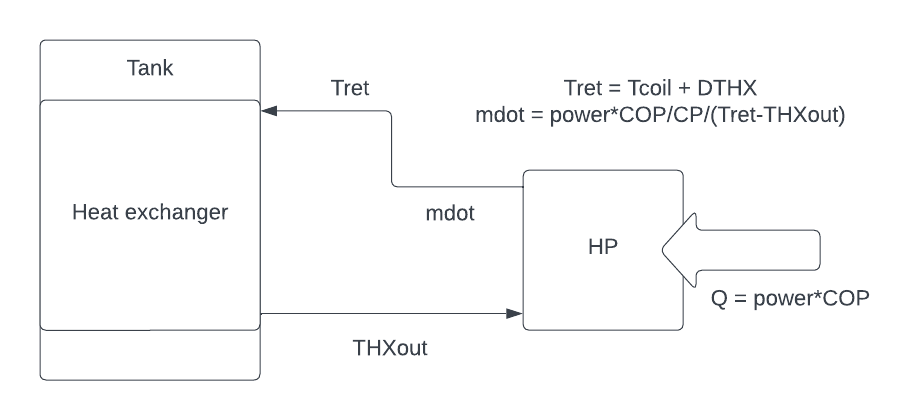
Schematic of Type 138 model
Assuming Tret is a constant temperature difference above the tank temperature (Tcoil), we define this difference as DTHX:
Tret = Tcoil + DTHXFrom this, we calculate the loop flow rate pflow1:
pflow1 = COP*Power/4.18/(Tret-THXout)DTHX determines tank stratification. Higher DTHX → greater stratification (top much hotter than bottom). Lower DTHX → less stratification. Minimum: 10 K (otherwise convergence issues).
Stratification refers to the temperature difference between the top and bottom of the tank. High stratification indicates the top is much hotter than the bottom. Low stratification indicates the top is close in temperature to the bottom.
The amount of stratification observed depends on the HP design: type of refrigerant, refrigerant charge, compressor capacity, microchannel surface area etc.
If the refrigerant releases all of its heat to the tank before it reaches the microchannel outlet, this can result in more stratification, as the bottom of the tank receives less heat than the top.
DTHX is determined by a calibration process referring to the AS/NZS 5125 data. We create a TRNSYS simulation of a single heat-up cycle which replicates test condition 2: same ambient air temperature, same initial tank temperature. Then we trial multiple values of DTHX until the modelled tank exhibits the same amount of stratification as we see in the AS/NZS 5125 test condition 2.
How do we know how long to run the simulation? Rather than simulating the exact same amount of time as the AS/NZS 5125 test condition 2, we run the TRNSYS model until we match the same final average tank temperature. This is because the HP heating performance in TRNSYS is based on COP and Power equations which were derived from regression using all four of test conditions 1-4, but now we are replicating test condition 2 only. So there will be a difference in the time it takes to achieve the same average temperature in TRNSYS compared to AS/NZS 5125 test condition 2.
DTHX Solution Algorithm
The ‘Calculate DTHX’ macro follows an algorithm to determine the final DTHX value. We are looking for the value of DTHX which gives minimal error between the simulation & test data, which we gauge by matching the top tank temperature at the end of the heat up cycle.
This pseudocode is programmed into the ‘Calculate DTHX’ button:
- Run simulation using initial guess of DTHX = DTHX1 = defined in TRNSYS tool
- Open ***.out file, find the time it takes to achieve near equal average temperature as 5125
- At this time, calculate error between final tank temperature, error = TRNSYS-5125.
- If error < TOL, exit algorithm.
- TOL = tolerated error for a successful final DTHX value
- Run second simulation using second guess of DTHX = DTHX2 = defined in TRNSYS tool
- If error < TOL, exit algorithm
- Loop until error < TOL:
- Interpolate/extrapolate using results of the previous two simulations to determine next best guess for DTHX, aiming for error = 0
- Run simulation using new guess of DTHX
- Calculate error
- Check if final DTHX < 10. If it is <10, set to 10.
Practical steps to calculate DTHX
- Data Acquisition:
- Request raw AS/NZS 5125.1 test data for test condition 2 from the test lab.
- If unavailable, extract data from the 5125 PDF report, ensuring that the raw data is obtained for audit submission later.
- Ensure the data has approximately 1-minute intervals between points.
- Data Formatting in DTHX_DATA Sheet:
-
Copy all 1-minute data for test condition 2 (18 < TDB < 20) into the “DTHX_DATA” sheet.
-
Arrange columns in the following order: “Date,” “Time,” dry bulb (“DB”), wet bulb (“WB”), temperature sensors (“TC1,” “TC2,” …, “TC6”), and average temperature (“TAVE”).
- Ensure columns use the specified codes in brackets to facilitate macro identification.
-
If “TAVE” does not exist, create a new column: “TAVE” = average(TC1:TC6).
-
Trim data so that it starts just before one of the sensors hits 15°C, i.e. remove unnecessary rows of data until the heatup cycle begins.
-
Remove all data after TC3>=60C
-
The data in DTHX_DATA sheet should look like the below:
.png)
-
- FAM_HP Sheet Processing:
-
In the “FAM_HP” sheet, click the “Process DTHX data” macro button at the top of the sheet.
- This macro calculates: average dry & wet bulb air temp, initial average water temp, final tank temperatures (top, average, bottom) for comparison against AS/NZS 5125
<figure><img src="/kms/image (69).png" alt=""><figcaption><p>DTHX data in FAM_HP sheet</p></figcaption></figure> -
Verify the data:
-
Do a sense check on the DTHX data in the FAM_HP sheet.
-
Check the DTHX_DATA_<MODELNAME> sheet (at the end of all worksheets), check that all formulae are correct.
-
The DTHX_DATA_*** sheet hides the middle rows so that you can see the start and end of the data. It calculates the required values on the right side. Check the formula in column Q are referencing the correct data cells/columns.
.png)
Saved copy of the DTHX Data for ECON155 model
-
-
- TRNSYS Tool Macro Method:
-
Set the first two initial DTHX guesses, DTHX1 & DTHX2 in FAM_HP using values such as below:
.png)
Initial DTHX guesses
-
Click “Calculate DTHX” in the TRNSYS tool, initiating 1-10 simulations to determine the DTHX value.
-
The macro iterates through DTHX values to find the one with the closest match in final top tank temperatures between TRNSYS and AS/NZS 5125.1 data, with a tolerance of 0.5K.
-
The macro checks the deltaT (difference) between TRNSYS and 5125 top tank temperatures, iteratively adjusting DTHX until deltaT < TOL = 0.1K.
-
Review the “DTHX_Solution” sheet to assess the results of each iteration.
-
.png)
DTHX solution process. Final error = 0.03 < 0.1.
Troubleshooting
- Experiment with different initial starting values for DTHX1 and DTHX2 if the algorithm struggles to find the final DTHX, defined in FAM_HP.
- If necessary, manually set DTHX1 and DTHX2 equal to the desired DTHX value, with DTHX TOL = 10, and run the “Calculate DTHX” macro. Review the “Calibration Report.” to ensure it is still an acceptable fit (temperature error < 1K ideally).
- Check “DTHX_<ModelName>” sheet for raw data and create plots for analysis, e.g. temperature vs time, to try find the source of error.
- If issues arise with low DTHX below 10K, adjust timestep to 0.005, check other deck parameters, and manually force DTHX higher at 1K increments until the simulation runs successfully.
- Flag any persistent issues for further investigation.